Thursday, 5 March 2020

S2 Unity Tutorial 6

Animation 

The tutorial for week six is all on animation. Animation being a big part of a lot of games is a very useful thing to know how to do, but actually getting them to work is a pain. 

My first taste of animations was in last semester when I was trying to activate a walking animation in my RTS project. At first that was awkward but was pretty easy in the end as I was only using to animations. In the tutorial however is a bit more complex using a few different animations.

It was pretty daunting at first as besides the amount of animations being used another significant difference was the layout of the animator use layers for different animations while my previous one only had the one layer. It only got worse as I started to run into errors that Ii was causing in my code because after making the mistake it would take me a while to actually find where I had gone wrong. 

All in all one thing to take away from this tutorial is that animation is irritating and time consuming task that needs to be done were necessary. 

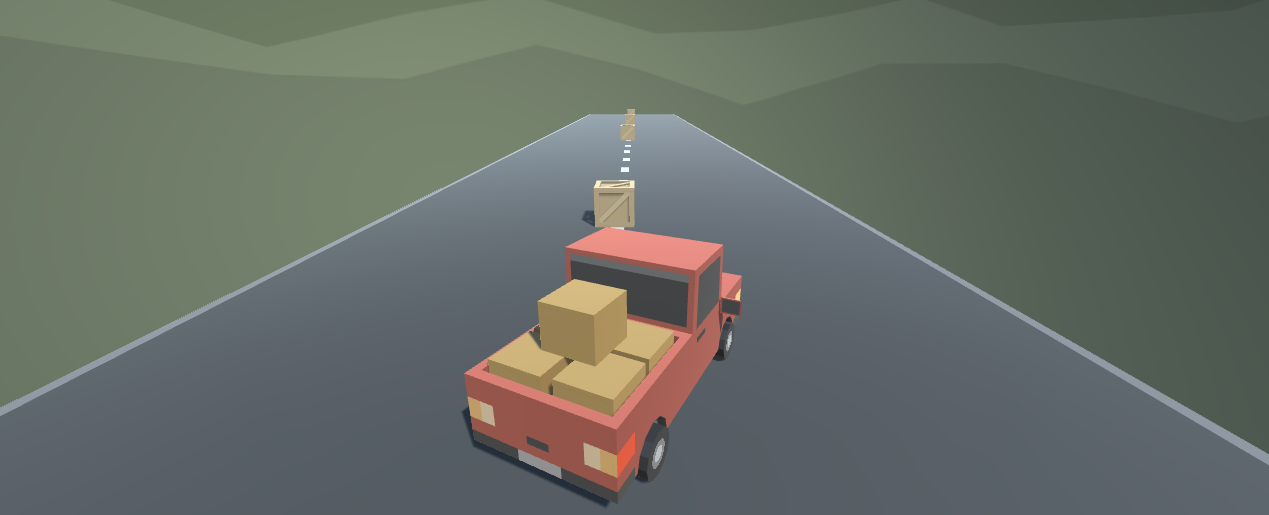
Screenshot of week 6 tutorial


Thursday, 27 February 2020

S2 Unity tutorial 5

Back on Track

So after changing from the VR tutorials to the basic Unity tutorials I finally got back on track with where we are meant to be in the tutorials for this week. This weeks tutorials were really helpful as it had us creating a projectile that moves forward from its relative to the why the object is facing. 

The other great part of the tutorial that I found helpful was on how to create a "Unit" spawner that could spawn what ever assets you had put into the array. The great thing about the array is that you can seem to have as many assets held within it to spawn as you want. The best part of the method used for the spawning assets was the way it could be easily changed to be 100% automatic.

Screenshot  of Prototype 2 tutorial

Thursday, 20 February 2020

S2 Unity tutorials 4

Unity tutorials 

So after hearing and seeing the "beginner" tutorials from Unity I decided to go back and start those in place of the VR tutorials. While the VR tutorials are interesting the beginner tutorials are far more useful as they go through basic game scripts. 

The main reason I changed the tutorials I was doing is because I decided to continue on with the game I started making in my last semester as my Multi Media Development project. One of the biggest problems I have when it comes to games development is the script mostly because when I first started the original tutorials I let a lot of the explaining of the scripts go over my head cause of how much other work I had to worry about. Having changed from doing the VR tutorials to the beginner tutorials I have fallen a little behind on the weekly tutorials but at the current pace I've been doing them I should be back on track soon enough. 

Tutorial 1 screenshot 

Thursday, 13 February 2020

S2 Unity Tutorial 2 + 3

VR Unity tutorials 


Second semester starting up and a new Multi Media Dev assignment. This time we were given a chose between some of the more basic unity tutorials and some VR tutorials. The basic tutorials were recommended to those of us who couldn't quite get a grasp on Unity in the last semester, the basic tutorials are Unity's own tutorials on making a game. The VR tutorials were suggested for those of us who enjoyed doing Unity in our last semester. I decided to take up the challenge of the VR tutorials since I'm not one to shy from a challenge given that I had dove into the deep end of the game dev project with the RTS. My initial impression of doing the VR tutorial was that it was going to be incredibly difficult to wrap my head around but having started them I pleasantly surprised with the tutorials. For the most part Unity's VR tutorials are easy to follow and understand some confusion may be caused by a differing layout of assets, folders and item locations. 

Screen shot of Unity VR titorial

Sunday, 8 December 2019

"Beta"

My "Beta"

So presentation is right around the corner and as I feared I was unable to make a complete game. But on the bright side what I do have seems to be work fine I haven't seen any bugs or glitches but knowing my look all the glitches well show for the presentation.

Screenshot of "Beta"

Unfortunately I am not where I would like to be I had a string of bad luck with my games development that really held me back. The biggest problem I have is, as expected, with the script. With an RTS game you select your units by left clicking for one, Shift left clicking of certain units and clicking and dragging a box for group selections, I can only manage to activate clicking and shift clicking or box selection, I can't seem to get these actions to work in unison with one another and have had to disable the box selection for my units.

Friday, 29 November 2019

Unity Free Tutorials

Making Progress

Through my endeavor to find Unity tutorials to help me with the scripting of my game I came across a channel that had a playlist of videos that really help kick start my progress after finally resolving the issue I had been having with my camera position. 

Th videos helped me to make my units selectable though the three  different methods commonly used in RTS games, that being click for a single unit, drag select for a large group and shift click specific units from a group. The tutorials also helped me set up markers to indicate what units are selected and which units aren't.

Screenshot of play test of game

Tuesday, 26 November 2019

Game Stories

Into the Woods: A Practical Guide to the Hero's Journey:

This article starts off by highlighting why the heroes journey is important and gives multiple examples of why the heroes journey is important. The article then proceeds to explain what the heroes journey is. The article summarizes the elements involved with a heroes journey and gives a list of these elements. The article then goes on to explain how the heroes journey can be used to build stories.

Screenshot of  "Into The Woods..."

What Every Game Developer Needs to Know about Story:

The second article was on the importance of story in games. The article states the games are not movies and are in turn their own form of story. The article goes over some common misconceptions about stories in games. the article also goes over why characters matter to the stories of games.

Screenshot of "...Needs to Know about Story"


Thursday, 21 November 2019

Week 9 Progress

Progress so far

Up until I was had started to make a lot of progress on my project game. I had managed to gather up the assets I intended to use in the final version and I had managed to set up a prototyping file specifically for testing my assets and getting everything ready for final version. However I had hit something of a brick wall in my progress as I was unable to get my RTS camera positioned correctly and was thus unable to test my assets and code. This halted my progress as I didn't want to write out code for different functions of the game encase they didn't work and I was afraid that I would only make things worse if I tried to fix a problem that I couldn't test,

Progress going forward

Now that I have finally managed to fix my RTS camera and can now test scripts as I write them I can finally get back on track with my progress which I have fallen a week behind where I would like to be and need to heavily focus on getting as much done as quickly as possible to be able to meet the given deaaline with an at least semi completed game. 

Indiana Bones is ready for an adventure 

Wednesday, 20 November 2019

Review Week Comments and Feedback

Feedback 

This week we're doing a lot of reflecting on our work for our multimedia development module and since the beginning we have been getting feedback on our blogs through the comments and the occasional feedback on our project.

The best place to find a constant flow of feedback  has been the comments on all the different posts of my blog and it's great to see people have been enjoying reading my blog posts and a=have been very active in helping point things out or giving advice for my project and it has been a huge help in making progress in making my game.

Prototype Progress

I have been getting a lot of encouragement from my classmates as well as my lecturer in regards to making my game and getting around all the problems that have arose during the making of my game.

Sunday, 17 November 2019

Prototyping First "Playable"


First Playable

Since my last post on my games prototype I have had a lot of ups and downs as expected and now with what progress I have made I am determined to go through with my plan for the RTS, although I'm not sure turning back is even an option at this point, and I'm going to get as much as I possibly can done which is going to be quite the feet for me to complete.


The Good:

On the brighter side I do have some good news in that my game prototype has gone from being just a few cubes to having most if not all the assets needed to for the games units and world. I have a number of different textures and enough units to make a more dynamic playing experience (if and when I get through the aforementioned problems) while I would have liked to have more units and structures what I do have will be plenty for an "Alpha" build if you will.


Screenshot show casing textures and assets

The Bad:

So the bad news. The bad news is that I have hit something of a wall as there are some rather minor albeit confusing complications. The biggest problem that I'm running into is with my camera for play testing the game. Even though the camera is very clearly positioned right over the units that I want it to be when I go into the game to test things out the camera snaps back to the origin point of the scene while staying at the same height that I placed it at meaning instead of the position being X: 481 Y: 60 Z: 442 it goes to X: 0 Y: 60 Z:0 this issue was something that I had gotten help to fix before and thought that it was fixed only to have it resurface again when I went to test the game again. The other issue that I have is more of a inconvenience than anything else is that one of the assets that I have for my game has no animations which are done with scripts instead.


Screenshot of my camera malfunction

The Ugly: 

While I feel I have all the necessary assets to build my game the problems I stated have more or less halted all progress that I can make as there isn't much that I can do until these problems are dealt with. 


Thursday, 14 November 2019

Unity Free Tutorials

Free Unity Tutorials:

This week we weren't given Unity tutorials to do, instead we had to go and find some of our own to help us with our projects of making our first game (unless others have already made a game then it would be their first). Anyway back on track I found two Unity tutorials one of which helps me while the second would have the ability to help everyone trying to use animations. 

How to make RTS Camera Movement in Unity:

So as I stated in one of my previous posts I have decide to try my hand at making a Real Time Strategy game. These games have a some what unique camera angle as they are almost always in a top down format meaning that the camera is constantly looking down on the map the angle of this view can be change slightly with scrolling and panning but retain the top down aspect. These games have you directing units by clicking where they need to go or attack. this makes the cursor the controller for the game and I needed a way to create this in Unity and thanks one of my classmates who gave me a link to a video showing how to do this I was able to make my own, so thank you.

Import Mixamo Characters to Unity 2017:

The second tutorial I watched was on how to animate a character model which had been confusing me quite a lot since I downloaded an asset pack that came with animations. I  tried to simply drag and drop the animation file onto the model but it would work and after trying a few more times with varies methods I gave up and took a break from that, but after watching the tutorial I got my character models to go from T-posing to stand normally. I figure this tutorial may help anyone also struggling with animating models.

No more T-posing


Tuesday, 12 November 2019

Game Fun

Game Fun

This weeks readings are on "game fun" and the link I followed brought me to a site called gamasutra which is chalked full of different articles on gaming however it should be stated that the articles are out of date and the newest of which were made in 2014. 

Hack-Man: An interview with Watch Dogs' creative director

The first article I read was of an interview with the creative director of "Watchdogs" Johnathan Morin. The interview touches on his feels with the game and how he feels that it is the next step in the next generation of gaming. 

Video games and gun violence: A year after Sandy Hook

The second article that I read was on a meeting with the U.S Vice President to speak about gun violence after a mass shooting in Sandy Hook Elementary school. This event lead to the first time that the President had taken formal political steps to study any purported link between violent video games and real-life violence. Within hours of the tragedy, Fox News was pointing fingers at video games, along with the usual suspects like reality TV and Facebook and many other news networks followed suit. CBS News went on to say that the victims of the shooting apparently amounted to some kind of 'score.'

Sunday, 10 November 2019

Prototyping

Game/Level Design

What's going wrong:

Starting with the negatives of my project, I'm trying to stick to the decision to make a RTS game and as much as I was expecting it to be an up hill battle to get it done it's proving harder than I had originally thought as I'm trying to find assets to us in the game but unfortunately that task is proving incredibly difficult, I have managed to find some good models to use but can't figure out how to turn the models into assets. another big problem I'm running into is find tutorials on how to make a RTS game while I found one series of tutorials it was just my luck that is wasn't on the same style I'm gunning for with mine.

What's going right: 

Well that's not hard to answer at all and the answer to this question is quiet simply put not much. Since I'm sort if only starting things off there still things that I haven't gotten around to doing or just haven't thought of yet all that does seem to be working well for me is the prototype of by world map which as of the moment is rather bare.
Screenshot of prototype game world

Tuesday, 5 November 2019

Games Decisions

Massively Multiplayer Online Games and Social Gaming: 

Lostgarden blog

This weeks reading is on the social aspect of gaming leaning into online gaming and social psychology.

The article starts off by listing off the problems revolving around an MMO or Massively Multiplayer Online game. The article rounds off the problems by pointing out were they stem from that being the key word of "Massively". This cause's problems with a games scale, pacing and level design. 

Social Groups:

Later on in the article it begins to touch on social groups and different aspects of society.  It begins by stating a brief explanation on what a social group is. 

Individuals in groups are connected to each other by social relationships.


Self-categorization perspective
 

is when an individual looks at a person or group of people and mentally puts them into a category. This act is something I don't like and try to avoid doing myself because I hate being compared to other people good or bad as I am my own person and I am not like someone else I'm like myself "If I have seen further than others, it is by standing upon the shoulders of giants."

 Social Cohesion Perspective 

Social cohesion goes hand in hand with categorization as it is the idea that we act according too shared social norms. My thoughts on social cohesion is more or less the same as social categorization as I feel that social norms lead to stress in some children and teenagers that may be afraid of stepping outside of what society deems normal.


Wednesday, 23 October 2019

Unity tutorial 5


The first tutorial was expanding on what the previous tutorial on putting together a simple yet effective cursor to help show the player where the screen is facing as the cursor is more often than not used to interact with in game objects. This tutorial shows how to make an object intractable and how to make select what button is used to interact with said object. This tutorial showed how to put text onto the canvas to give the player instructions on how to play the game and the objective that they are trying to achieve. 

The second tutorial was on incorporating weapons into the game. the weapon on question that was used n the tutorial was a simple hatchet. In games the hatchet is a rather common melee weapons used in hack 'n' slash games. the tutorial showed us how to give the player character the hatchet as well as how to code the animation for swinging the melee weapon.

Tuesday, 22 October 2019

Games GDD

The Early Stages of the Design Process GDD

This article touches on the process of designing a game. The article states that most beginning game designers method of piecing together a game is to just find a bunch of elements and throw them together and call the final product a game. the article finishes this point by saying that the results of this method of game design tends to end up being hit or miss in the end. The article goes on to ask multiple questions regarding game design, such as How do you come up with an initial design?, What is the most effective way to playtest? and How do you know what to change? 

Design Consideration

The article provides links one of which is for things to consider when designing a game. the article in the link refers to the process of designing a board game, this however can still be applied to game design of different forms of media. This article talks about different parts of a game to consider throughout the process, such as a games components which can go a long way in determining how much a game is enjoyed. Another point the article makes is on the box which exists to not only protect the item held within but also to give the first impression to someone who sees it. the article than goes on to talk about the theme stating that it's important that the theme works with the game rather than against it. the last thing this article touches on are the games rules. The section on the rules gives different advice on how to go about forming the rules for the game.


Monday, 21 October 2019

Game Vision Statement

Game Vision Statement

Introduction:
For my game project i have decided to try and make a game in one of the genres that i play personally. At first i thought I would Just focus on the to main genres i play that being shooters and hack 'n' slash games. after some consideration i figured i might try something a little more unique and try a Real Time Strategy.

Genre: Real Time Strategy 
A real Time Strategy game pits two or more factions against each other to achieve an objective from eliminating the enemy faction to capturing a point. Examples of Real Time Strategy games can be found here.

Gameplay: 
In a Real Time Strategy game a player must collect resources and build up an army. The resources are used to build and upgrade bases, defenses, units and anything else that the game may have that needs to be purchased. The player often starts with one or two small units that can be used to go and collect resources or find the enemy.the game is over when the player completes the objective, loses all their bases or the objective is destroyed. Movement in a Real Time Strategy game is done by hovering the cursor over a particular unit and clicking on it to select it or group selecting units and clicking where you want them to move to, interacting with in game objects is done in the same way as moving units only when you select an intractable object it will often give you an option as to what action to preform. To stop selecting something in a Real Time Strategy all that needs to be done is to click anything that isn't intractable. 

Platforms: 
Platforms are the system on which the game is played. Real Time Strategy games are on the three major platforms PlayStation, Xbox and PC, however they are more often played on PC. 

005 Ardennes2
Company of Heroes (image found at strategygamer.com)


Tuesday, 15 October 2019

Game MDA

Reading 1

 A Formal Approach to Game Design and Game Research:

The paper starts off by explaining what the contents of the article. The introduction begins by stating that all artifacts are created within some design methodology. the  intro goes on to explain what is meant by a MDA (Mechanics, Dynamics, and Aesthetics) framework. MDA is a formal approach to understanding games, one which attempts to bridge the gap between design and development. The article explains that game design and authorship happen at many levels. The MDA framework is proposed as a tool to help designers, researchers and scholars. The article goes on to stat that games are made by designers and development teams to be consumed by the players and continues by saying that the difference between games and other entertainment such as books or movies in that the consumption of games is relatively unpredictable. 

MDA framework diagram

Thursday, 10 October 2019

Workshop 01

Video 1: Improving Graphics

The first video tutorial this week was on improving some graphics. the video showed how to put in water features in the terrain such as ponds but this can be expanded into making lakes rivers or beaches. The video also thought us how to make the gem a collectible item with a sound effect to signal its collection along with helping us to get the script code to activate turn the gem in to an intractable object and when the sound effect is to be triggered.  The video also thought us how to shape a cube into a rectangular wall using the objects scale controls. 

Gem in my game

Video 2: Raycasting and Cursor

 In the second video of this we were thought about raycasting and cursors. Raycasting is the method of measuring the distance between the player model and an object this can also be helpful when it comes to bug fixing for a game. The cursor is an object on a 2D plane in the players view that is used to help tell the player exactly where their character is facing this can be important if the player needs to look directly at an object in the game in order to interact with it.

Tuesday, 8 October 2019

Game Elements

Players

Players are an integral part of games as the way they play can effect how the enjoy the game or sometimes even how others enjoy the game depending on the circumstances. A lot of games hsve different features but they will likely have something in common with another game with how the game is played. Two of the most common systems in modern video games are PvP which is short for Player vs Player games and PvE which is short for Player vs Environment. PvP games pit players against each other either in teams or in one vs one  games where one team or player must over come the other to gain victory. PvE on the other hand pits players against the games systems. For example lets look at the modern FPS Call of Duty as it is a title many may recognize. Call of Duty offers both PvE in its solo campaign where the player will fight through NPC or Non Player Characters, this system while used in this situation is is rather linear as it directs the player where to go it can be used to create non linear games where the player is forced to explore in order to find the right path a good example of which would be Dark Souls which also employs a primarily PvE system. The other system used in Call of Duty is the PvP system were the game pits players against each. This system is different as players of different skill levels may be put against each other which may negatively impact how one player enjoys the game. 

Call of Duty: Modern Warfare 3
Image of Call of Duty Modern Warfare 3 PvP Gameplay 


S2 Unity Tutorial 6

Animation  The tutorial for week six is all on animation. Animation being a big part of a lot of games is a very useful thing to know how...